
To submit an ANCHOR benefit application online, you sign in through the state filing system using your ID, PIN, and passcode—or by verifying your identity with ID.me. The filing deadline for the current season is November 2, 2026.
ANCHOR Benefit Online Filing Form
Use the steps below to complete your ANCHOR benefit online filing.
ANCHOR Benefit Online Filing Login
Log in to the ANCHOR filing site to get started:
- Open the ANCHOR filing page: https://www1.state.nj.us/TYTR_Saver/jsp/common/HBWelcome.jsp
- Select whether you are a renter or a homeowner, then click Continue.

If you are a renter
- Choose Sign in with ID.me
- Follow the on-screen instructions to sign in with ID.me (a passcode may not be required).

If you are a homeowner
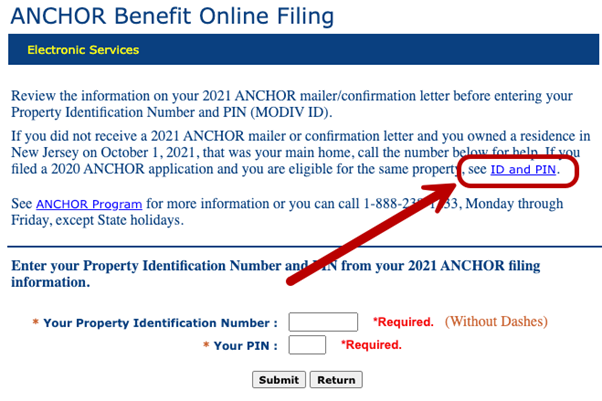
- Enter your PIN and Property Identification Number, then click Submit.
- Choose Sign in with ID.me and follow the instructions (you may need to enter your passcode and Social Security number).
- If you do not remember your ID or PIN, use the ID and PIN recovery link on the page, or sign in with ID.me to retrieve them.


Already have an ID.me account?
Do not create a second account. Sign in with your existing ID.me credentials.
- Choose Sign in with ID.me
- Complete multi-factor authentication (MFA)
- Sign in and enter any other requested information
- On the Authorize screen, review what data New Jersey will receive, then choose Allow to continue.
Confirm your identity
For New Jersey ANCHOR Property Tax Relief, you can verify your identity in one of two ways:
Self-Service
Upload a valid document (driver’s license, state ID, passport, or passport card) and a selfie. The system guides you through each step so you can complete verification at your own pace.
Video Call
Enter your details and upload a government-issued photo ID, then join a live video call with an agent who will verify you against your ID.
ANCHOR Benefit Online Filing – Phone number
For help with online filing or other ANCHOR questions, contact the program hotline:
- ANCHOR hotline: 1-888-238-1233
- Division of Taxation: (609) 826-4282
Lines are busiest during peak ANCHOR season. You can also get in-person help at a Regional Information Center or at outreach events held across the state during the filing period.
ANCHOR Benefit Online Filing – Passcode
The ANCHOR passcode (from your mailing) is not the same as the ID.me MFA code. The ANCHOR passcode is used only for the ANCHOR application; the MFA code is used to verify your identity when signing into ID.me.
Use the passcode from your ANCHOR mailing to access the online application. If you do not have that passcode, you can still sign in with ID.me and complete MFA. If you need help with your passcode, the ANCHOR hotline can assist. Homeowners and renters receive mailings with filing instructions and how to apply.
ANCHOR Benefit Online Filing – Status
If you received an ANCHOR Benefit Confirmation Letter, your application was filed using the data on file. Payments are issued on a rolling basis, usually starting in September. You can check your benefit status at anchor.nj.gov or propertytaxrelief.nj.gov.
Other New Jersey property tax relief
ANCHOR is one of several state property tax relief programs. Stay NJ offers additional relief for eligible seniors and disabled residents. Senior Freeze (Property Tax Reimbursement) helps qualifying seniors and disabled persons limit increases in their property taxes. Seniors and certain disability recipients can apply for these programs using the combined PAS-1 application at propertytaxreliefapp.nj.gov by the November 2, 2026 deadline.